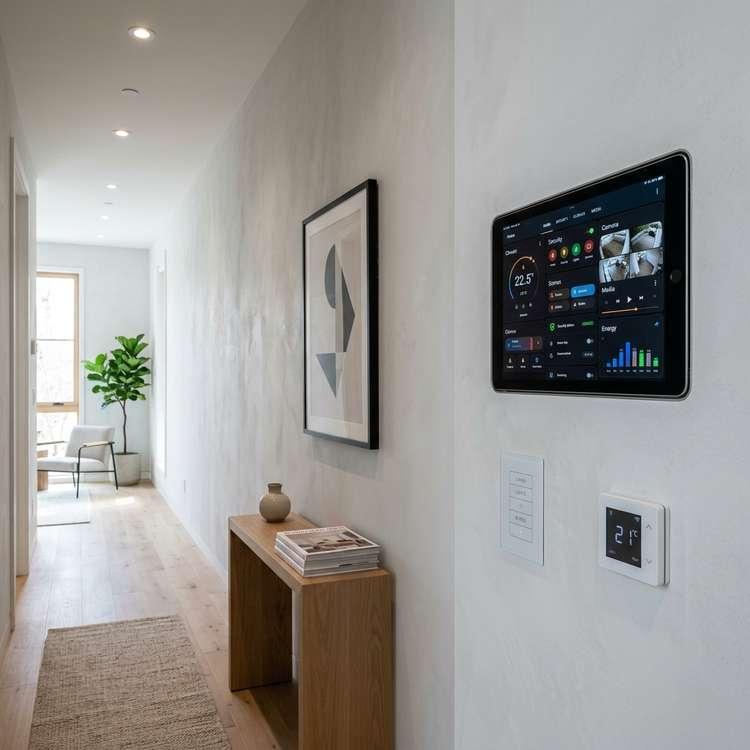
As the number of connected smart home devices in our houses continues to grow, managing multiple light switches, remote controls, and separate phone apps can become frustrating. In high-end smart home design, the key to a seamless experience is centralized control. Exploring smart home wall mount control panel ideas represents an excellent way to simplify your daily routine, coordinate your smart home scenes, and keep your walls clean and clutter-free. By mounting a dedicated control panel or tablet flush on your wall, you can manage lighting, music, climate, and security from a single, clean touchscreen interface.
The Core Philosophy of Centralized Control
A smart home wall panel acts as the main command center for your house. Instead of searching for your phone to dim the lights or adjust the thermostat, a wall-mounted panel provides instant access at key transition points. By programming custom “scenes” (such as “Good Morning,” “Away,” or “Movie Time”), a single touch adjusts multiple devices across the home. This centralized control is essential for creating a highly functional smart home that is easy for family members and guests to use.
5 Clean Setup Tips for Smart Wall Panels
1. Select the Right Hardware: Tablets vs. Dedicated Panels
The first step is choosing your control panel hardware. You can choose dedicated smart home controllers like the Brilliant Smart Home Control panel, which replaces standard light switches. Alternatively, you can use a standard tablet, like an iPad or Samsung Galaxy Tab, running dashboard apps like Home Assistant, ActionTiles, or Apple Home. Dedicated panels fit into standard electrical boxes, while tablets provide larger screens for viewing security cameras and music playlists.
2. Install a Flush Wall Mount for a Clean Look
To make your control panel look premium, mount it flush with the plaster. Avoid bulky brackets that stick out from the wall. Instead, use recessing wall mounts (such as VidaMount or iPort) that hold the tablet flush against the drywall. Choose a paintable bezel or matching metal trim that coordinates with your light switches, ensuring the control panel blends seamlessly with your home’s interior design.
3. Plan for Hidden Power and Outlets
A premium control panel should never have visible, hanging power cords. Plan your wiring prior to mounting. If you are using a standard tablet, install a recessed electrical box behind the mount containing a hidden USB transformer. Alternatively, you can run a low-voltage Power over Ethernet (PoE) cable through your walls to the tablet mount. PoE provides both power and stable wired internet connection over a single cable, keeping your walls clean and clutter-free.
4. Choose Strategic transition Locations
Placement is critical for a panel you will use daily. The best spots are in high-traffic transition zones: in the main entryway (to set the “Away” scene when leaving), in the kitchen (for managing music and lighting while cooking), or in the master bedroom hallway (to turn off all home lights at night). Place the panel at a comfortable eye-level height of fifty-six to sixty inches from the floor.
5. Design a Simplified, Custom Dashboard Interface
A cluttered touch screen is difficult to use. Customize your smart home dashboard interface to display only the most critical controls. Group controls logically: keep lighting scenes, thermostat settings, and speaker volume on the main page. Create separate tabs for advanced settings like security camera feeds or energy monitoring. Keep the background dark to reduce glare at night, and choose simple icons for a clean, modern look.
Comparison: Smart Phone Apps vs. Wall Mount Control Panels
| Control Feature | Smart Phone Apps Only | Wall-Mounted Control Panel |
|---|---|---|
| Accessibility | Low (must unlock phone, open app, & wait for load) | High (always on, instant touch control at wall) |
| Guest Usability | None (requires sharing Wi-Fi passwords & apps) | High (simple, intuitive interface for anyone to use) |
| Wall Aesthetics | Standard wall switches cluttering the plaster | Clean (replaces multiple switches with one screen) |
| Network Connection | Wi-Fi only; subject to dead zones | Stable (can be hardwired via Power over Ethernet) |
Network Stability and Safety Configurations
Because your control panel manages critical home functions, security is a priority. Connect your wall-mounted tablet to a separate virtual local area network (VLAN) isolated from your personal computers and smart phones. This prevents hacker access to your home automation system if a personal device is compromised. Ensure your dashboard app is configured with guest restrictions, preventing visitors from editing automation rules or accessing master security cameras. Proper configuration keeps your smart home safe, secure, and easy to run.
To learn more about optimizing your space, explore our guide on Smart Mirror Workout Home Gym Tech.
For additional tips on creating a beautiful home, read our article about Smart Home Lighting Ideas.
If you are planning a renovation, you might also find our ideas on Smart Home Protocols Explained helpful.
To discover more sustainable choices, check out our tips on Best Smart Indoor Security Cameras for Home.
Enhance your living space further by exploring our recommendations for Best Smart Video Doorbells.