
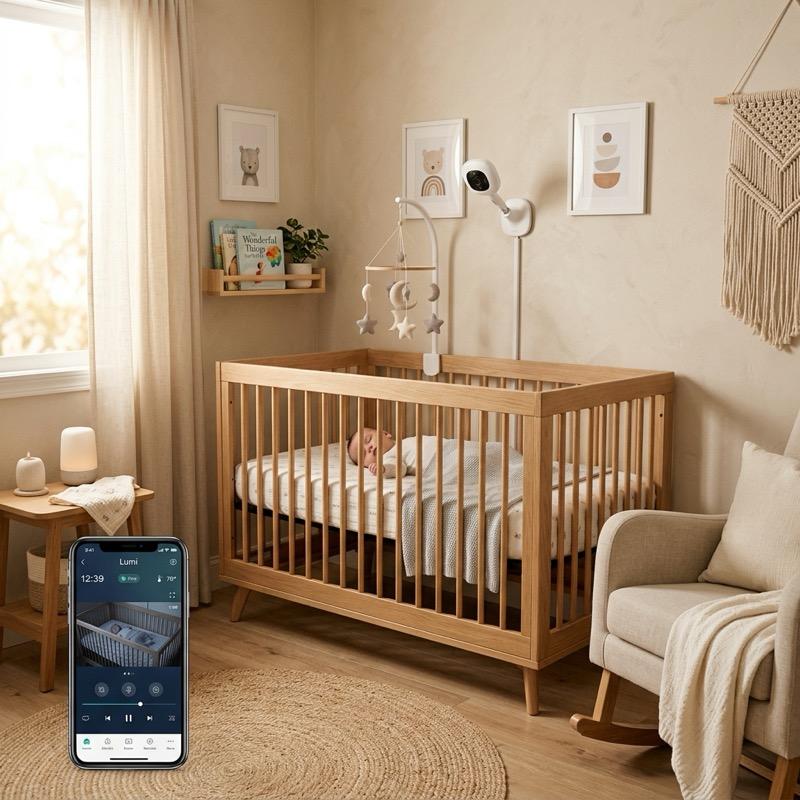
Welcoming a new baby into the family brings immense joy, along with a natural desire to ensure their safety and well-being at all times. In the modern smart home, parents are increasingly upgrading from standard audio monitors to advanced video and health-tracking systems. Setting up these devices correctly is essential for optimal performance, making a proper smart baby monitor setup a top priority for new parents. A well-planned installation provides clear video feeds, tracks breathing and sleep patterns, and ensures that the device is secure from external digital threats. In this comprehensive guide, we will walk you through the key elements of a smart baby monitor setup, compare leading models, and detail crucial safety and security practices.
Choosing the Best Camera and Sensor Locations
Choosing the best camera and sensor locations is the first and most critical step in your smart baby monitor setup. The camera should be positioned to provide an unobstructed view of the entire crib, allowing you to see your baby clearly. For wall-mounted models, place the camera at least three feet away from the crib, ensuring the power cable is completely out of the baby’s reach. If you are using a sensor pad or a wearable monitor, ensure it is placed according to the manufacturer’s guidelines to prevent false alarms. Correct placement ensures that the system can track your baby’s movements and vital signs accurately without posing any physical danger. This safety precaution is vital for preventing infant accidents.
Audio and Video Quality Requirements
High-quality video and audio are essential for monitoring your baby during the night. Look for a monitor that offers at least 1080p resolution and high-quality infrared night vision, which allows you to see your baby clearly in complete darkness. The camera should also have a wide-angle lens or remote pan-and-tilt capabilities, giving you the ability to scan the room if your toddler crawls out of bed. High-sensitivity microphones are also critical, allowing you to hear even the quietest whimpers, and two-way audio lets you talk to and soothe your baby from another room, reducing the need to enter the nursery. Clear audio communication helps reassure your child without physical intervention. By choosing a camera with these high-performance audio and video features, you can rest assured that you will never miss a single detail in the nursery.
Smart Health Tracking and Sleep Analytics
Many modern monitors offer advanced health-tracking and sleep analytics, which can provide extra peace of mind for anxious parents. These systems utilize smart sensors, wearable bands, or computer vision to track your baby’s heart rate, oxygen levels, and breathing patterns. The app analyzes this data to generate sleep reports, showing you how long your baby slept, how many times they woke up, and their overall sleep quality. While these tools are not medical devices, they can help you establish healthy sleep routines and alert you immediately if they detect any unusual changes in your baby’s breathing or movement. This information can be incredibly helpful for pediatrician consultations.
Securing Your Monitor Against Digital Threats
Securing your connected monitor against hacking is a crucial aspect of a smart baby monitor setup that must not be overlooked. Because these cameras connect to your home Wi-Fi network, they can be vulnerable to unauthorized access if not properly secured. To protect your family’s privacy, always change the default administrator username and password on your router and monitor. Enable two-factor authentication on the monitor’s app, and ensure that your home Wi-Fi network uses strong encryption, such as WPA3. Keeping the monitor’s firmware updated is also essential, as manufacturers regularly release security patches to protect against new vulnerabilities. A secure baby monitor installation keeps your home private.
Integrating Monitors with Smart Home Hubs
Integrating your baby monitor with other smart home devices can create a seamless and convenient nursery environment. By connecting the monitor to systems like Amazon Alexa or Google Home, you can stream the camera feed directly to a smart display on your nightstand or kitchen counter. You can also create automated routines, such as having the nursery’s smart lights dim when the monitor detects that the baby is asleep, or having a smart plug turn on a white noise machine when the baby starts crying. These integrations make it easier to manage the nursery while keeping your hands free for other tasks. This connected convenience is a game-changer for busy households. Creating these automated routines makes it much easier to manage your household chores while ensuring your baby’s sleeping environment remains completely undisturbed and peaceful.
Comparing Smart Baby Monitors
| Monitor Model | Camera Resolution | Health Metrics Tracked | Security Features | Relative Cost |
|---|---|---|---|---|
| Nanit Pro Camera | 1080p HD | Breathing, sleep tracking, temp | 256-bit encryption, 2FA | $$$ (High) |
| Owlet Dream Sock | 1080p HD | Heart rate, oxygen, sleep states | AES 128-bit encryption, 2FA | $$$$ (Very High) |
| Miku Pro Smart | 1080p HD | Contactless breathing, sleep analytics | Crypto chip, secure boot, 2FA | $$$$ (Very High) |
| CuboAi Plus Smart | 1080p HD (night vision) | Rollover alert, covered face alert | End-to-end encryption, 2FA | $$$ (High) |
| Lumi by Pampers | 1080p HD (ultra-wide) | Sleep tracking, diaper wetness | Secure Wi-Fi link, 2FA | $$ (Moderate) |
Cable Management and Mounting Safety Rules
Cable management and mounting safety are critical rules that every parent must follow to prevent accidents. When designing your smart baby monitor setup, you must treat all cords as potential strangulation hazards. Keep the camera and all power cords at least three feet away from the crib, and use wall-mounted cord covers to secure cables firmly against the wall. Never drape cords over the edge of the crib or leave them loose on the floor where a crawling baby could pull them. Double-check all wall mounts to ensure the camera is securely attached and cannot fall into the crib, and inspect the mounts regularly to make sure they remain tight. Physical safety must always come first when arranging nursery technology.
Troubleshooting Connectivity and Power Issues
Troubleshooting connectivity and power issues is another important part of managing your new nursery monitor. If you experience lag or dropped connections, ensure that the monitor is within range of your Wi-Fi router. You can test this by checking the signal strength on your phone near the crib. If the signal is weak, consider installing a Wi-Fi repeater or upgrading to a mesh network to ensure a stable, continuous feed. For battery-powered parent units or wearable sensors, establish a routine of charging them during the day when the baby is awake, ensuring they have full power for overnight monitoring. Regular updates of the monitor app also ensure smooth operation and fewer glitches. This routine maintenance keeps your monitoring equipment running smoothly all night long.
Wrapping up, a proper smart baby monitor setup is an essential step in creating a safe, connected, and peaceful nursery for your child. By choosing the ideal camera placement, securing your Wi-Fi network against hacking, and managing power cords safely, you can ensure the system performs reliably. Utilize advanced features like sleep analytics and smart home integrations to make daily monitoring easier and more convenient. Always prioritize physical safety rules, and keep your software updated to protect your family’s privacy. With a secure and efficient baby monitoring system, you can enjoy peace of mind and focus on enjoying your time with your growing baby. It is a wonderful investment in your family’s comfort and security.
To learn more about optimizing your space, explore our guide on Smart Mirror Workout Home Gym Tech.
For additional tips on creating a beautiful home, read our article about Smart Home Wall Mount Control Panel Ideas.
If you are planning a renovation, you might also find our ideas on Smart Home Lighting Ideas helpful.
To discover more sustainable choices, check out our tips on Smart Home Protocols Explained.
Enhance your living space further by exploring our recommendations for Best Smart Indoor Security Cameras for Home.