With rising utility costs and a growing global focus on climate responsibility, modern homeowners are actively looking for ways to reduce their home energy footprint without sacrificing comfort. While basic conservation habits like turning off lights help, true efficiency in 2026 requires an automated, data-driven approach. By utilizing this comprehensive smart home energy management guide, you can learn how internet-connected sensors, solar battery systems, and intelligent automation rules work together to monitor your electrical energy usage, eliminate waste, and lower your monthly bills automatically.
What is Smart Home Energy Management?
Smart home energy management refers to an integrated network of hardware monitors and software applications that track, analyze, and control the flow of electricity to all appliances in your home. Instead of waiting for a monthly utility bill to see how much power you consumed, smart energy tools provide real-time, second-by-second data. These systems can identify which specific appliances are consuming the most power, detect inefficiencies, and automatically adjust your heating, cooling, lighting, and charging systems to run during the cheapest, most eco-friendly times of the day, maximizing efficiency.
1. Install a Smart Energy Monitor in Your Main Panel
The foundation of any efficient energy setup is a smart home energy monitor installed directly inside your main electrical panel. These devices utilize current transformers (CT clamps) wrapped around the main service wires to measure the total current entering your home. Advanced monitors use machine learning to recognize the unique electrical signatures of different appliances—such as your refrigerator cycle or dryer—allowing you to track individual device consumption without installing separate smart plugs on every outlet. This provides a complete overview of your baseline power draw.
2. Integrate Solar Panels and Battery Storage Systems
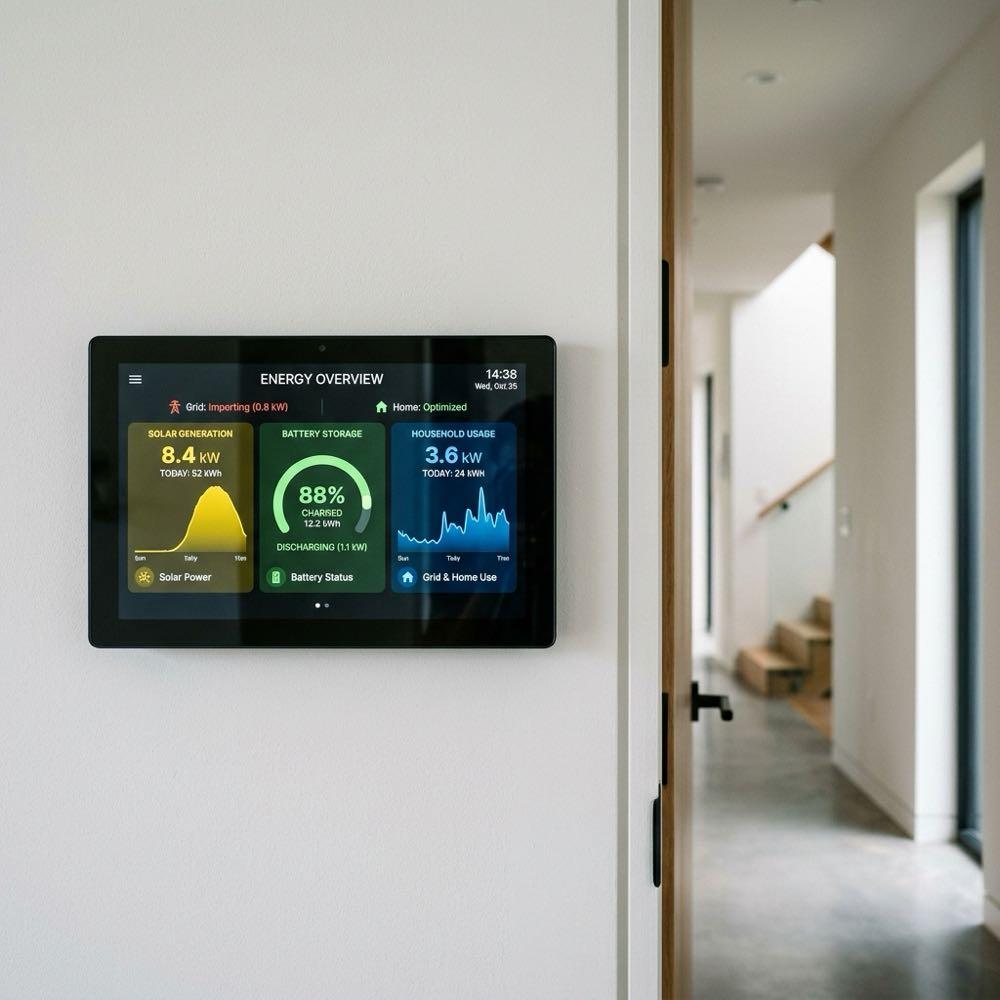
If you have installed residential solar panels, integrating them into your central smart dashboard is a critical step. As detailed in any smart home energy management guide, solar integration allows you to match your energy generation with your daily consumption. By connecting your solar inverter and battery backup system (like a Tesla Powerwall) to your smart network, you can monitor exactly how much power you are generating, how much is stored, and how much is being exported back to the electrical grid. This data helps you optimize your energy usage to maximize self-consumption.
3. Set Up Automated Time-of-Use Smart Rules
Many electric utility companies utilize “Time-of-Use” (TOU) pricing, charging significantly higher rates for electricity during peak hours (usually late afternoon and evening) and lower rates during off-peak hours (overnight and early morning). You can use your smart home hub to create automation rules that shift your heaviest electrical loads to off-peak periods. Set your electric vehicle charger, dishwasher, and pool pump to turn on automatically after midnight when rates are cheapest, and program your system to draw power from your solar battery during expensive peak hours, saving money.
4. Utilize Smart Plugs to Eliminate Vampire Power Load
Even when turned off, many electronic devices—such as TVs, game consoles, microwave clocks, and chargers—continue to draw small amounts of electricity. This is known as “vampire load” or standby power, and it can account for up to 10% of your average household utility bill. A key recommendation of our smart home energy management guide is using smart plugs with built-in energy monitoring to eliminate this waste. Program these plugs to cut power completely to entertainment centers and office desks overnight or when your geofencing system detects that no one is home.
5. Optimize HVAC Usage with Smart Thermostats
Heating and cooling make up the largest portion of a home’s energy consumption, often accounting for over 50% of the total utility bill. Installing a smart thermostat allows you to optimize this heavy load. Use sensors in different rooms to ensure you are only heating or cooling active spaces. Program the thermostat to raise the temperature slightly in the summer (or lower it in the winter) when you leave for work, and use geofencing to return the house to a comfortable temperature just before you arrive. This simple automation maintains comfort while preventing wasteful HVAC operation in empty rooms, significantly reducing thermal losses and saving money on heating bills.
6. Automate Smart Shades to Control Solar Heat Gain
Your windows are major sources of heat transfer, letting in cold drafts in winter and hot solar rays in summer. Automating your window treatments is a passive way to lower your HVAC load. In the summer, program your smart blinds or shades to close automatically on west-facing windows during the hot afternoon to block solar heat gain, reducing the load on your air conditioner. In the winter, open the shades on south-facing windows during the morning to let natural sunlight heat your home, and close them at night to trap warmth.
7. Monitor Water Heating Energy Consumption
Water heaters are the second-largest energy users in most homes. If you have an electric tank water heater, it constantly turns on throughout the day to keep water hot, even when you are asleep or at work. By installing a smart water heater controller, you can schedule the heating cycles to align with your daily routines. Program the water heater to turn off overnight and while you are at work, and turn back on 30 minutes before your morning shower. This simple automation prevents standby heat loss, keeps your water hot only when needed, and lowers your baseline energy draw significantly without impacting your daily comfort.
8. Maintain and Calibrate Your Energy Monitor Sensors
To ensure your energy tracking system remains accurate, perform basic maintenance. Check the Wi-Fi connection to your panel monitor periodically, as signal drops can lead to gaps in your energy logs. Once a year, have a licensed electrician inspect the CT clamps in your electrical panel to ensure they have not slipped or become loose, which can cause incorrect current readings. Keep your companion app updated to access the latest machine learning algorithms for appliance recognition, ensuring your dashboard remains highly accurate and functional for long-term forecasting.
Summary: Smart Home Energy Management Features Checklist
Assess and optimize your household power consumption using this checklist compiled from our smart home energy management guide:
| Key Component | Recommended Choice | Smart Home Purpose |
|---|---|---|
| Panel Monitor | Multi-circuit electrical panel monitor with CT clamps and Wi-Fi | Measures total household draw and identifies specific appliance cycles |
| Solar Hub | Integrated solar inverter and home battery storage dashboard | Tracks solar generation and optimizes battery charging schedules |
| Smart Plugs | Wi-Fi smart plugs with built-in energy monitoring features | Cuts standby vampire power to entertainment systems overnight |
| Thermostat | Smart thermostat linked with multi-room temperature sensors | Optimizes HVAC heating and cooling schedules based on occupancy |
| Window Shades | Automated cellular shades programmed for solar heat control | Blocks summer heat gain and retains winter warmth passively |
Wrapping up, by following this smart home energy management guide, you can take complete control of your household utility costs. By installing a smart monitor in your panel, integrating solar battery systems, setting up automated schedules for peak periods, and using smart plugs to eliminate standby power, you create a home that is both highly efficient and environmentally friendly. Plan your automation steps, track your savings, and enjoy the financial and environmental benefits of a truly smart, low-carbon home.
To learn more about optimizing your space, explore our guide on Smart Mirror Workout Home Gym Tech.
For additional tips on creating a beautiful home, read our article about Smart Home Wall Mount Control Panel Ideas.
If you are planning a renovation, you might also find our ideas on Smart Home Lighting Ideas helpful.