
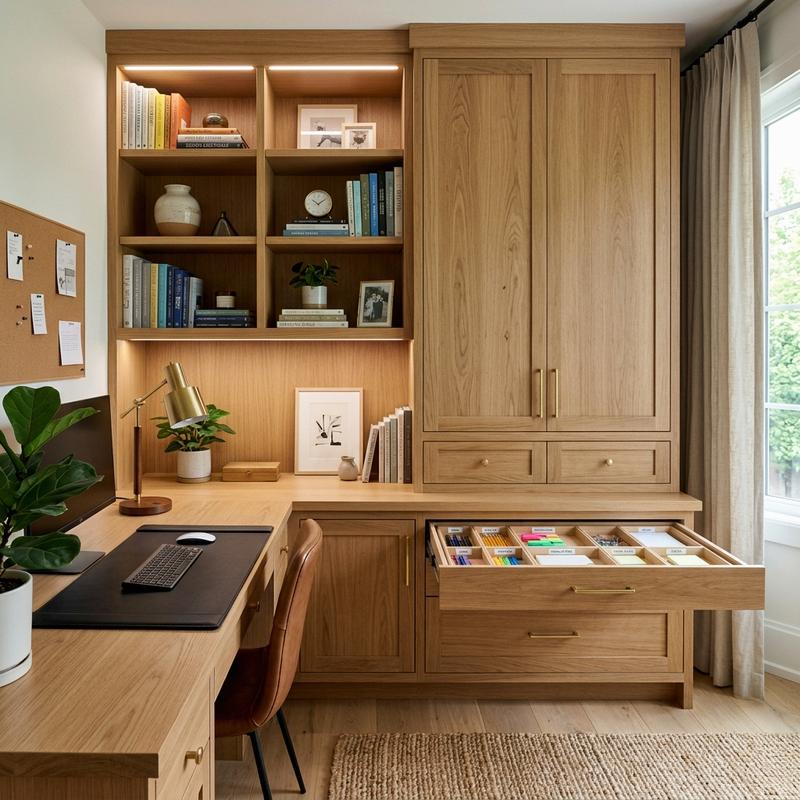
In our modern era of digital workflows and remote entrepreneurship, the home office has evolved into a central productivity hub. However, a workspace filled with scattered paperwork, tangled cables, and unorganized office supplies can quickly become a source of mental stress and distraction. As space planners and interior architects, we have designed and optimized hundreds of home workspaces. We know that a cluttered desk leads to a cluttered mind. Creating a clean, distraction-free environment requires a careful balance of aesthetic design and smart storage planning. Exploring Home Office Storage and Organization and using custom cabinet layouts represents the perfect opportunity to keep your workspace organized and beautiful. In this guide, we will explore the architecture of office organization and detail five cabinet setup tips to design a clutter-free study.
The Architecture of Office Organization: Active vs. Archival Storage
To design an organized home office, you must understand the difference between active and archival storage. In our design practice, we divide storage into three zones based on how often items are used. Zone One (Active Storage) includes items you use daily—such as your keyboard, mouse, notebook, and favorite pens. These should sit on your desktop or inside your top desk drawer, within arm’s reach. Zone Two (Reference Storage) includes items you use weekly—such as reference binders, project files, and secondary tech accessories. These should be stored in nearby drawers or mobile cabinets. Zone Three (Archival Storage) includes items you use monthly or annually—such as tax records, historical files, and backup tech. These should be stored in upper wall cabinets or a separate closet.
By categorizing your items and placing them in their designated zones, you prevent your desktop from becoming a dumping ground for clutter. Keep your writing surface completely clear of folders and binders. This spatial organization reduces cognitive load, allowing you to focus on your work without being distracted by visual clutter, and saves you time during busy work hours.
Additionally, paper management is critical in home offices. Despite the rise of digital tools, paperwork still accumulates quickly. Design a simple “In-Box/Out-Box” system to manage incoming documents, and shred or digitize papers immediately to prevent build-up. A clean paper management flow keeps your desk looking professional, organized, and free of clutter, helping you stay focused throughout the day.
5 Storage and Cabinet Setup Tips for Clutter-Free Work
1. Custom Built-In Wall Cabinets and Credenzas
Custom built-in wall cabinets and credenzas are the ultimate storage solutions for home offices. Built-ins utilize vertical wall space up to the ceiling, providing massive storage capacity while keeping the floor space open. A credenza placed behind your desk chair is a classic layout that provides a long, flat surface for printers and displays, with closed cabinets below to hide paperwork.
When planning built-ins, look for modular cabinet systems that can be customized to fit your room. The IKEA Sektion Cabinet System is a highly versatile option that can be configured with solid white doors, glass shelves, and integrated LED spotlights. For a premium look, work with a local carpenter to build custom walnut cabinets that match your desk wood. Closed cabinet doors are essential for hiding visual clutter, keeping your office looking clean and professional.
2. Mobile Under-Desk File Cabinets
A mobile file cabinet is a versatile and compact storage solution for small offices. Because it sits on wheels, you can roll it under your desk to save space, or roll it out to serve as an extra side table or printer stand. Look for file cabinets with a low profile that can slide easily under standard desk heights.
The Steelcase Mobile Pedestal Cabinet is a premium steel cabinet built to last, featuring deep drawers for hanging folders and lockable wheels. For a colorful, modern look, the Poppin 3-Drawer Filing Cabinet is a popular choice, offering durable metal construction and matching accessories. Dedicate the top drawer to daily supplies and use the deep bottom drawer to file important papers, keeping your desk clutter-free.
3. Modular Drawer Divider Inserts and Tech Organizers
Desk drawers can easily become messy utility drawers filled with loose pens, paperclips, and cables. To prevent this, use modular drawer divider inserts to create a designated space for every item. Group similar items together—such as pens, sticky notes, and charging cables—and keep them organized in their own compartments.
Choose high-quality inserts made from natural wood or felt, such as the Grovemade Wood Drawer Organizer. These dividers look premium and prevent items from sliding around when you open the drawer. For tech accessories like hard drives, card readers, and USB hubs, use a dedicated tech organizer bag, allowing you to store your tech gear neatly in a drawer when not in use.
4. Wall-Mounted Pegboards and Open Display Shelves
Wall-mounted pegboards and open shelves are excellent for keeping frequently used tools organized and off your desktop. A pegboard allows you to customize your storage by hanging hooks, shelves, and baskets, keeping your scissors, headphones, and chargers within reach and looking highly styled.
The IKEA Skadis Pegboard is a favorite among remote workers, offering a clean design and a wide variety of matching clips and shelves. If you prefer a premium shelving system, the Vitsoe 606 Universal Shelving System is a classic modular design that mounts to the wall, allowing you to combine bookshelves, writing desks, and cabinets in a clean layout that can be expanded over time.
5. Cord Organizer Boxes and Hidden Power Strips
Messy cables and power strips are a major source of visual clutter in home offices. To hide them, use cord organizer boxes on the floor or mount your power strips underneath your desk. Cord boxes hide messy plugs and cables inside a clean box, keeping your floor area looking neat and easy to clean.
The D-Line Cable Management Box is a simple, modern box with cord slots on either side, allowing you to hide power strips and cables easily. Pair it with hook-and-loop wraps to bundle cords together. By hiding all power blocks and cables, you can transform your desk area from a messy tech station into a clean, modern workspace.
Comparison of Storage Cabinets and File Drawers
| Storage Option | Storage Capacity | Floor Space Used | Best Suited For | Key Design Advantage |
|---|---|---|---|---|
| Built-In Wall Cabinets | High (uses vertical wall space) | Medium (along one wall) | Dedicated studies & reference books | Seamless integration & high capacity |
| Mobile File Drawers | Medium (sits under desk) | Low (slides under desk) | Small spaces & active paper filing | Versatile placement & roll-away storage |
| Wall Pegboards | Low (for daily tools) | 0 sq ft (wall-mounted) | Accessory styling & quick access | Customizable hooks & creative look |
| Office Credenza | High (closed doors below) | Medium (rear wall placement) | Printers, binders, & file storage | Provides flat top surface & clean layout |
A Step-by-Step Guide to Organizing Your Desk Drawers
To organize your desk drawers like a professional, follow this simple four-step process. First, pull the drawer out and empty all contents onto your desk. Group similar items together and throw away old pens, empty packaging, and unused papers. Second, clean the inside of the drawer with a damp cloth and measure the dimensions. Third, insert modular wood or felt dividers that match the drawer size. Finally, place your sorted items into their designated compartments, keeping your daily pens and notebooks in the front for easy access. Testing and organizing these details guarantees a clean, clutter-free workspace.
Once your drawers are organized, commit to a daily routine. Take five minutes at the end of every workday to clear your desktop, file away papers, and place tools back into their drawer slots. This simple habit keeps your desk clean, ensures a fresh start the next morning, and helps you maintain a highly productive and beautiful home office.
Frequently Asked Questions
1. What is the difference between active and archival storage?
Active storage holds items you use daily, like your keyboard, mouse, and notebook, placed within arm’s reach. Archival storage holds items you use monthly or annually, like tax records and tech backups, stored in upper wall cabinets or a closet.
2. How do drawer dividers improve desk organization?
Drawer dividers create separate compartments for different items, preventing pens, clips, and cables from mixing together. This organization keeps your drawers tidy and allows you to find your tools instantly, saving time and reducing stress.
3. Should I choose open shelves or closed cabinets?
We recommend using closed cabinets for storing paperwork, tech cables, and unorganized office supplies to hide visual clutter. Use open shelves to style books, plants, and decorative objects, adding a touch of personality to your home office.
4. How deep should an office credenza be?
An office credenza should have a depth of eighteen to twenty-four inches. This depth provides sufficient space to store binders, file folders, and large printers on the top surface, while allowing the credenza to fit comfortably along your office wall.
5. What is the best way to store important paperwork?
The best way to store paperwork is to digitize documents immediately using a scanner app, and file the physical copies in a lockable file cabinet. Use labeled hanging folders categorized by topic, such as taxes, medical, and home records.
6. Can I build custom cabinets using modular furniture?
Yes, modular systems like IKEA Sektion or Billy bookshelves are excellent for creating a custom built-in cabinet look. Screw the cabinets together, anchor them to the wall studs, and add custom molding at the top to create a seamless look.
7. How do I hide a printer in my home office?
To hide a printer, place it inside a deep cabinet drawer with a pull-out shelf, or place it on a shelf inside a closed credenza. Ensure the cabinet has a grommet hole at the back to run power and USB cables to the printer easily.
8. What is the advantage of a mobile file cabinet?
A mobile file cabinet sits on wheels, allowing you to slide it under your desk to save space, or roll it out to serve as an extra side table. This versatility is ideal for small home offices and multi-functional guest rooms.
9. How do I manage cables inside my drawers?
To manage cables in drawers, use small canvas pouches or custom grid organizers to hold individual cables. Wrap each cable with a hook-and-loop wrap to prevent tangles, and label the pouches to identify charger types easily.
10. What pegboard accessories are best for home offices?
The best pegboard accessories include sturdy metal hooks for headphones, shallow shelves for small plants or clocks, and small hanging cups or containers to organize pens, pencils, scissors, and other daily writing tools.
To learn more about optimizing your space, explore our guide on Smart Home Tech for Seniors.
For additional tips on creating a beautiful home, read our article about Non-Slip Flooring Solutions.
If you are planning a renovation, you might also find our ideas on Wheelchair Accessible Bathroom Design helpful.
To discover more sustainable choices, check out our tips on Grab Bars and Safety Features.