
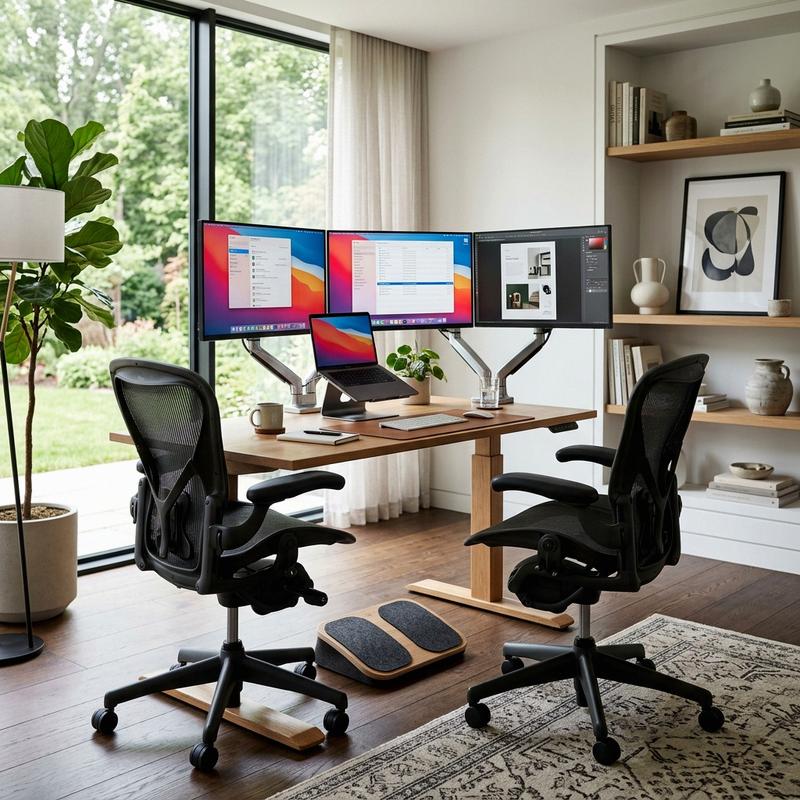
In our modern era of extended screen time and remote employment, the physical impact of our workspaces on our bodies has become a critical health consideration. Many professionals spend upwards of eight to ten hours a day seated at a desk, often using generic dining chairs or poorly aligned tables. As space planners and interior architects, we have witnessed how this lack of physical support leads to chronic back pain, neck strain, repetitive strain injuries, and long-term joint damage. Investing in high-performance Ergonomic Home Office Furniture is not a luxury. It is a necessary health measure that directly improves comfort, focus, and productivity. In this guide, we will explore the science of workspace ergonomics and detail five key furniture pieces that will keep you comfortable and supported all day long.
The Science of Ergonomics: Posture and Movement
Ergonomics is the study of designing the workspace to fit the human body, rather than forcing the body to adapt to the furniture. In our design practice, we focus on the “Neutral Posture”—a state of skeletal alignment where your joints are naturally aligned, reducing stress on muscles, tendons, and bones. Achieving this posture requires adjusting your chair, desk, and screens to match your body’s measurements. When your furniture is set up correctly, your body remains relaxed, circulation improves, and fatigue is minimized, allowing you to focus completely on your work.
One of the most important elements of neutral posture is the alignment of the spine. The human spine features a natural S-curve that must be supported. A standard flat chair back flattens this curve, putting pressure on the lower back disks. An ergonomic chair with adjustable lumbar support maintains this natural curve. Additionally, your elbows should sit at a ninety-degree angle, your wrists should remain flat, and your feet should sit flat on the floor, keeping your body balanced and free of strain.
Beyond static alignment, ergonomics emphasizes the importance of movement. Modern ergonomic science advocates for the “sit-stand-move” cycle. Sitting in one position for hours—even in the best chair—slows circulation and causes muscle tightness. By alternating between sitting and standing every thirty to forty-five minutes, you activate muscle groups, improve blood flow, and boost your energy levels. Incorporating active movement into your workday is key to long-term health and focus.
5 Key Pieces of Ergonomic Furniture for All-Day Comfort
1. High-Performance Ergonomic Task Chairs
The office chair is the most critical piece of ergonomic furniture in your workspace. When choosing a chair, avoid trendy gaming chairs or basic foam seats. Look for high-performance task chairs that offer independent adjustments for seat height, seat depth, armrest position, and lumbar support. The goal is to choose a chair that can be customized to match your body’s unique shape.
The gold standard in ergonomic seating is the Herman Miller Aeron Chair. Designed with a breathable woven mesh seat and back, the Aeron distributes your weight evenly and keeps you cool. Its PostureFit SL system supports the sacrum and lower spine, maintaining the natural curve of your back. Another exceptional choice is the Steelcase Gesture Chair, which feature armrests that mimic the movement of the human arm, supporting your elbows whether you are typing on a keyboard or holding a tablet. For those who prefer a fabric finish, the Haworth Fern Chair features a flexible, leaf-like back design that adjusts to your movements, providing continuous support.
2. Electric Height-Adjustable Standing Desks
An electric height-adjustable standing desk is essential for incorporating movement into your workday. A high-quality standing desk should feature dual electric motors, a heavy-duty steel frame, and a programmable control keypad that allows you to save your favorite sitting and standing heights. This makes transitioning between sitting and standing fast, smooth, and easy.
The Uplift V2 Standing Desk is one of the most reliable desks available, featuring a sturdy steel frame with crossbar stability and a wide variety of wood top options. Another premium choice is the Steelcase Migration SE Desk, known for its quiet, smooth motors and durable design. When adjusting your standing desk, ensure the height allows your elbows to rest at a ninety-degree angle when typing, and keep your shoulders relaxed. Avoid standing on hard floors for long periods; use a thick foam anti-fatigue mat to cushion your feet and joints.
3. Dynamic Monitor Arms and Gas-Spring Mounts
Positioning your monitor at the correct height and distance is key to preventing neck and eye strain. If your screen is too low, you will naturally tilt your head forward, putting strain on your neck muscles. A dynamic gas-spring monitor arm allows you to adjust the height, depth, and angle of your screen easily, keeping it aligned with your eyes as you change positions.
The Ergotron LX Monitor Arm is a premium aluminum mount that provides smooth, effortless movement and holds heavy screens securely. For clean, minimalist offices, the Humanscale M8.1 Monitor Arm features a sleek, integrated cable management system and a slim profile. When setting up your screen, position the top of the monitor at eye level, and place the screen about an arm’s length away. Angle the screen slightly backward to match your natural line of sight, ensuring a comfortable view.
4. Ergonomic Keyboard Trays and Slanted Footrests
To keep your wrists flat and your shoulders relaxed, consider installing an under-desk keyboard tray. A high-quality keyboard tray allows you to adjust the height and tilt of your keyboard, creating a negative tilt angle where the keyboard slopes away from you. This position keeps your wrists in a natural, straight alignment, preventing repetitive strain injuries like carpal tunnel syndrome.
Pair your keyboard setup with an adjustable slanted footrest under your desk, such as the Humanscale FM500 Footrest. A footrest is especially helpful if your desk is high and your feet do not rest flat on the floor. It supports your lower legs, improves circulation, and encourages movement by allowing you to rock your feet back and forth. These small adjustments keep your body balanced and comfortable throughout the day.
5. Under-Desk Walking Treadmills and Active Balance Boards
To add active movement to your workday, consider adding an under-desk walking treadmill or an active balance board. An under-desk treadmill allows you to walk at a slow, comfortable pace (around one to two miles per hour) while typing, reading documents, or participating in calls, helping you stay active and focused.
The Lifespan TR1200-DT3 Under-Desk Treadmill is a quiet, durable machine designed to fit under standing desks. If you prefer a simpler option, an active balance board like the FluidStance Plane Board encourages micro-movements while standing, strengthening your core and keeping your joints active. Adding these tools to your workspace helps you stay active, burn calories, and maintain high energy levels throughout the day.
Ergonomic Setup Specifications and Guidelines
| Furniture Piece | Key Ergonomic Adjustment | Ideal Position Guideline | Recommended Brand & Model |
|---|---|---|---|
| Task Chair | Lumbar support, seat height/depth, armrests | Spine supported in S-curve; feet flat on floor | Herman Miller Aeron / Steelcase Gesture |
| Standing Desk | Electric height adjustability | Elbows at 90-degree angle; shoulders relaxed | Uplift V2 / Steelcase Migration |
| Monitor Arm | Gas-spring height, depth, and tilt | Top of screen at eye level; arm’s length away | Ergotron LX / Humanscale M8.1 |
| Footrest | Angle adjustment, rocking movement | Flat under desk; supports feet & lower legs | Humanscale FM500 |
| Active Board | 360-degree tilt, micro-movements | Used while standing to engage core muscles | FluidStance Plane Board |
A Step-by-Step Guide to Adjusting Your Ergonomic Office Setup
To set up your ergonomic office correctly, follow this step-by-step process. First, sit in your chair and adjust the seat height so that your feet rest flat on the floor and your thighs are parallel to the ground. Leave a two-inch gap between the front of the seat cushion and the back of your knees. Second, adjust the backrest tilt and lumbar support so that your lower back is fully supported. Third, adjust the desk height so that your keyboard and mouse are level with your elbows, allowing your shoulders to rest. Finally, mount your monitors on adjustable arms and set the top of the screens at eye level. Testing and adjusting these settings ensures long-term comfort and health.
Once your desk and chair are set up, focus on your keyboard and mouse placement. Place them close to the edge of the desk so you do not have to stretch your arms forward to reach them. Use a wrist rest to keep your wrists flat and comfortable. By planning and adjusting every detail of your ergonomic setup, you can design a beautiful, healthy workspace that protects your body and helps you stay focused throughout the day.
Frequently Asked Questions
1. What is the most important feature of an ergonomic chair?
The most important feature of an ergonomic chair is adjustable lumbar support. This support maintains the natural S-curve of your spine, reducing pressure on your lower back discs and preventing slouching, keeping you comfortable and supported during long work hours.
2. How high should a standing desk be set?
A standing desk should be set to a height where your elbows rest at a ninety-degree angle when typing on the keyboard. Keep your shoulders relaxed and your wrists straight, preventing muscle strain in your neck, shoulders, and wrists.
3. How far should a computer monitor be from your eyes?
A monitor should be placed about an arm’s length away from your eyes (approximately twenty to thirty inches). The top of the screen should sit at eye level, allowing you to look straight ahead without tilting your head forward or backward.
4. Are mesh chairs better than foam chairs?
Mesh chairs are generally better than foam chairs for hot climates because they are highly breathable and distribute your weight evenly. High-quality mesh chairs, like the Herman Miller Aeron, maintain their shape and support for years without flattening.
5. Do I need an anti-fatigue mat for a standing desk?
Yes, an anti-fatigue mat is highly recommended if you use a standing desk on hard floors. The soft foam cushioning reduces stress on your feet, knees, and hips, improves blood circulation, and allows you to stand comfortably for longer periods.
6. What is the benefit of a negative tilt keyboard tray?
A negative tilt keyboard tray slopes the keyboard slightly away from you, keeping your wrists straight and flat when typing. This position reduces stress on the tendons in your wrists, preventing repetitive strain injuries like carpal tunnel syndrome.
7. How often should I transition from sitting to standing?
We recommend transitioning from sitting to standing every thirty to forty-five minutes. Stand for about fifteen to twenty minutes, then return to sitting, helping you stay active, improve blood circulation, and maintain high energy levels.
8. Can a footrest help if my desk is too high?
Yes, an adjustable footrest is an excellent solution if your desk is high and your feet do not rest flat on the floor. It supports your lower legs, relieves pressure on your thighs, and improves blood circulation throughout your body.
9. How does an active balance board work at a standing desk?
An active balance board features a curved base that requires you to make constant micro-movements to stay balanced. These movements engage your core muscles, strengthen your ankles, and keep your joints active while standing.
10. Is an under-desk treadmill loud?
Under-desk treadmills are designed to be much quieter than standard gym treadmills. Premium models, like the Lifespan TR1200, operate at a quiet hum, allowing you to walk and work without disturbing your video calls or focus.
To learn more about optimizing your space, explore our guide on Smart Home Tech for Seniors.
For additional tips on creating a beautiful home, read our article about Non-Slip Flooring Solutions.
If you are planning a renovation, you might also find our ideas on Wheelchair Accessible Bathroom Design helpful.
To discover more sustainable choices, check out our tips on Grab Bars and Safety Features.
Enhance your living space further by exploring our recommendations for Aging in Place Home Modifications.