In our modern era of digital screens and endless video calls, lighting has become one of the most critical yet neglected components of home office design. Many remote workers set up their desks in dark rooms, under harsh fluorescent ceiling lights, or facing bright windows, leading to eye strain, headaches, and physical fatigue. As space planners and interior architects, we have designed and optimized hundreds of home workspaces. We have seen firsthand that poor lighting directly contributes to physical discomfort and decreased professional output. Developing a well-balanced lighting plan is not just about choosing a stylish lamp. It is a science that directly impacts your eyes, focus, and energy levels. In this guide, we will explore the physics of light and detail five setup tips for Productive Home Office Lighting to keep you focused and comfortable throughout the day.
The Physics of Light: Circadian Rhythms and Eye Strain
To design a productive lighting setup, you must understand how light affects the human body. In our design practice, we focus on three core lighting metrics: color temperature, color rendering index (CRI), and brightness (measured in lux). Color temperature is measured in Kelvins (K) and ranges from warm orange light (2700K) to cool blue light (6500K). Cool blue-white light (around 4000K to 5000K) stimulates the brain, improves alertness, and reduces sleepiness, making it ideal for morning and afternoon focus. Warm light (around 2700K to 3000K) encourages relaxation, making it perfect for winding down in the evening.
The second metric is the Color Rendering Index (CRI). CRI measures how accurately a light source reveals the true colors of objects compared to natural daylight. A CRI of ninety or higher is essential for home offices, especially for designers, artists, and anyone working with color, as it prevents eye strain and makes the room look vibrant. Finally, brightness must be balanced. The ideal brightness for reading and computer work is around 300 to 500 lux. If your room is too dark, your eyes must work harder to read screens, causing strain and fatigue. Balanced brightness keeps your eyes relaxed and focused.
Beyond screen focus, lighting directly regulates your body’s internal clock, known as the circadian rhythm. Exposure to natural daylight or cool-toned light in the morning stimulates cortisol production, keeping you awake and active. Exposure to warm, low-intensity light in the evening encourages melatonin production, preparing your body for restful sleep. A successful home office lighting setup works in harmony with these natural cycles, adjusting color temperature and intensity throughout the day to support both your productivity and your health.
5 Setup Tips for Productive Home Office Lighting
1. LED Monitor Light Bars and Screen Bars
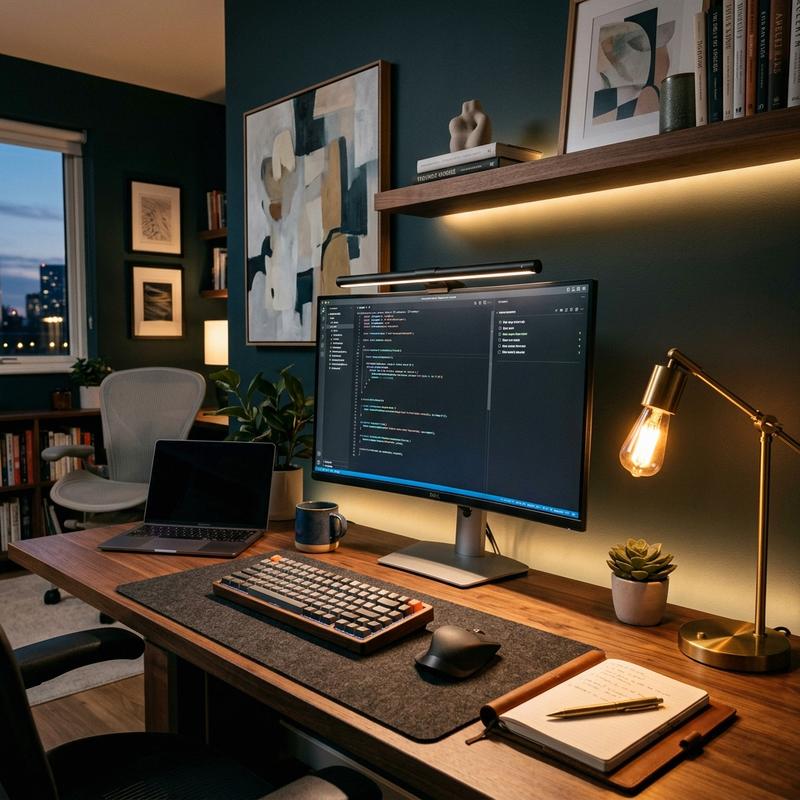
An LED monitor light bar is one of the most innovative and effective lighting upgrades for modern workspaces. A monitor light bar clamps directly to the top of your computer screen, casting a clean, controlled beam of light down onto your keyboard and desk space. This asymmetrical optical design ensures the light illuminates your writing surface without casting any glare or reflections on the screen, preventing eye strain.
The BenQ ScreenBar is the pioneer in this category, featuring a built-in ambient light sensor that adjusts the brightness automatically based on the room’s conditions. Another excellent choice is the Xiaomi Mi Computer Monitor Light Bar, which includes a wireless remote control to adjust color temperature and brightness from your desk. By illuminating your workspace evenly and keeping the screen free of reflections, a monitor light bar helps you focus and reduces eye strain during long hours of computer work.
2. Adjustable Metal Task Lamps and Swing Arms
Task lighting is essential for focusing light exactly where you need it, especially when reading physical documents or sketching. An adjustable swing-arm task lamp allows you to position the light source close to your work surface, preventing shadows and glare. Choose a lamp with a heavy base or a clamp that mounts to the edge of your desk to save valuable workspace.
The Anglepoise Type 90 Desk Lamp is an iconic British design featuring a spring-balanced mechanism that allows you to adjust the lamp position with a light touch. For modern, minimalist workspaces, the Artemide Tolomeo Tavolo Lamp is a classic Italian design with a polished aluminum frame and adjustable joints. Position your task lamp on the opposite side of your writing hand—on the left if you are right-handed—to prevent your hand from casting shadows across your paper.
3. Smart Ambient Lighting and Circadian Shifting
To reduce eye strain, you must avoid working in a dark room with only a bright computer screen illuminated. This high contrast forces your eyes to adjust constantly between the bright monitor and the dark room, causing strain and fatigue. To prevent this, install soft ambient lighting behind your desk or around the room to balance the brightness.
The Philips Hue Smart Lighting System is the gold standard for home office customization. Install Hue smart bulbs in your overhead fixtures and place a Hue Play light bar behind your monitor to cast a soft glow on the wall. Program the smart lights to shift color temperatures automatically throughout the day: bright cool-white light (5000K) at 9:00 AM for focus, and warm amber light (2700K) after 6:00 PM to help your body transition into evening relaxation, keeping your circadian rhythms balanced.
4. Diffused Overhead Lighting and Glare Control
Overhead lighting provides the base layer of light for your room, but it must be planned carefully to prevent glare. Avoid exposed light bulbs or harsh fluorescent tubes that cast direct, intense light down onto your desk. Instead, choose fixtures with fabric shades, frosted glass covers, or recessed LED panels that diffuse the light evenly throughout the room.
p>If your office features recessed ceiling spotlights, install dimmable LED bulbs to adjust the brightness based on the time of day. Angle the spotlights so they illuminate the walls or bookshelves rather than casting light directly onto your monitors, preventing screen glare. Dimmable, diffused overhead light sources allow you to create a comfortable, balanced base layer of light that supports your task lighting.
5. Natural Daylight Management and Window Position
Natural daylight is the healthiest and most pleasant light source for any office, but it must be managed to prevent glare and heat build-up. Position your desk at a ninety-degree angle to windows rather than directly facing them or having them behind you. Having a window behind you causes direct sunlight to reflect off your monitor, while facing a window places a bright light source behind your screen, straining your eyes.
To manage natural light, install adjustable light-filtering window blinds or shades. Solar shades are an excellent choice because they block heat and glare while allowing you to enjoy views of the outdoors. You can also use sheer linen curtains to soften direct sunlight, creating a bright, glare-free environment. Utilizing natural daylight in a controlled way helps you stay focused, saves energy, and connects your workspace to the outdoors.
Comparison of Color Temperatures and Work Suitability
| Color Temperature (Kelvin) | Light Quality Appearance | Best Suited For | Impact on Energy & Focus |
|---|---|---|---|
| 2700K – 3000K | Warm, golden, amber glow | Evening wind-down & reading | Relaxing; encourages melatonin production |
| 3500K – 4000K | Neutral, clean white light | General desk work & typing | Balanced; comfortable for extended use |
| 5000K – 6500K | Cool, crisp, daylight blue-white | Morning focus, detail work, art | Stimulating; blocks sleepiness and boosts focus |
A Step-by-Step Guide to Planning Your Office Lighting
To design the perfect lighting setup, follow this simple four-step process. First, determine the natural light entry points and place your desk at a ninety-degree angle to the window. Second, install your task lighting—such as an adjustable swing-arm lamp or a monitor light bar—to illuminate your workspace directly. Third, add smart ambient background lighting behind your monitor to balance the screen’s brightness and eliminate harsh contrast. Finally, install dimmable, diffused overhead fixtures to serve as the base light layer. Adjusting these layers throughout the day ensures a comfortable, healthy, and highly productive workspace.
Once your lights are installed, verify their placement. Turn on your monitors and check for any reflections or shadows on the screen. Adjust the angle of your lamps to ensure they do not shine directly into your eyes. By planning and adjusting every detail of your lighting layers, you can design a beautiful home office that protects your eyes, improves your focus, and keeps you comfortable throughout the day.
Frequently Asked Questions
1. What is the best color temperature for working in a home office?
The best color temperature for working is cool-white light between 4000K and 5000K. This temperature mimic daylight, stimulates brain activity, improves focus, and reduces sleepiness, making it ideal for morning and afternoon work sessions.
2. What is an LED monitor light bar and how does it prevent glare?
An LED monitor light bar clamps to the top of your monitor and casts light downward onto your desk using an asymmetrical optical design. This prevents light from shining directly onto your screen or into your eyes, eliminating glare and reflections.
3. Why does working in a dark room with a bright monitor cause eye strain?
Working in a dark room with a bright monitor causes high contrast, forcing your eyes to adjust constantly between the bright screen and the dark surroundings. This constant adjusting tires your eye muscles, causing strain, headaches, and physical fatigue.
4. What does CRI stand for and why is it important?
CRI stands for Color Rendering Index. It measures how accurately a light source displays the true colors of objects compared to natural daylight. A CRI of ninety or higher is recommended for home offices to prevent eye strain and ensure color accuracy.
5. Where should a task lamp be placed on a desk?
A task lamp should be placed on the opposite side of your writing hand—on the left side if you are right-handed—to prevent your hand from casting shadows across your paper. Angle the light down onto your work surface to avoid shining it directly into your eyes.
6. How does smart lighting support remote work?
Smart lighting allows you to schedule color temperature and brightness changes throughout the day. You can use cool-white light in the morning to boost focus, and transition automatically to warm, dim light in the evening to prepare your body for sleep.
7. What is the ideal brightness level for desk work?
The ideal brightness level for reading, writing, and computer work is between 300 and 500 lux. This level ensures your workspace is sufficiently illuminated, preventing eye strain without being too bright or casting harsh glares.
8. Should I use recessed ceiling lights in my home office?
Yes, recessed lights are great for general ambient lighting, but they should be dimmable and angled toward walls rather than shining directly down onto computer monitors, preventing harsh screen reflections and glare.
9. Can window blinds help manage home office lighting?
Yes, light-filtering solar shades or sheer curtains are highly recommended. They block heat and direct sunlight glare while allowing soft natural light to enter the room, helping you stay comfortable and connected to the outdoors.
10. What is the benefit of a dimmable desk lamp?
A dimmable desk lamp allows you to adjust the brightness based on the time of day and the task. You can use maximum brightness for detailed paper work, and lower the light during computer work to balance the ambient room light.
To learn more about optimizing your space, explore our guide on Smart Home Tech for Seniors.
For additional tips on creating a beautiful home, read our article about Non-Slip Flooring Solutions.
If you are planning a renovation, you might also find our ideas on Wheelchair Accessible Bathroom Design helpful.
To discover more sustainable choices, check out our tips on Grab Bars and Safety Features.
Enhance your living space further by exploring our recommendations for Aging in Place Home Modifications.